
Yes. Add your existing drawings as Plan Sheets and use them as a reference for project photos. You do not need to create an Interior Scan before using an existing plan sheet.
See Your Project in Maps, Plans & 3D
See where project photos were captured, review floor plans, and explore 3D models—all in Filio.

INTERIOR SCAN
Capture a Room. Review It in 2D & 3D.
Follow Filio’s on-screen guidance to capture a room, then review the processed result in 2D and 3D.
Illustrative marker placement
Explore the 2D floor plan and 3D room model.
- Review what was captured
- Check the room boundaries in the 2D floor plan and rotate the 3D room model to inspect the layout.
- Keep the result with your project
- Review the scan name and space type, then choose Use This Scan to save the reviewed result to your selected project.
PROJECT CONTEXT
Maps & Plan Sheets
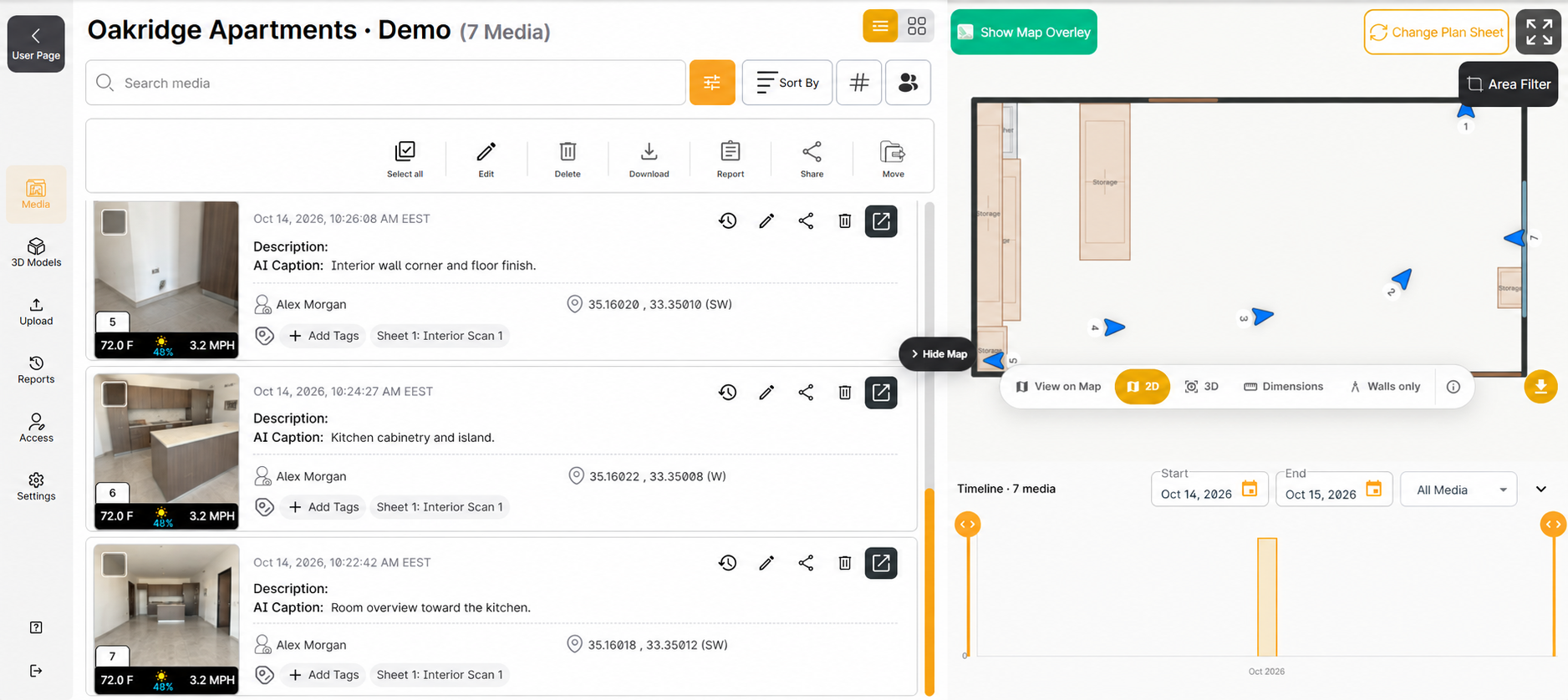
View project photos alongside their map or plan locations and available capture details.
- description Use the plans you have
- Add floor plans and site drawings as PDF, JPG or PNG Plan Sheets.
- photo_library Open the matching photo
- In Filio, select a map or plan marker to see its linked photo and available details.
- explore Understand the viewpoint
- Review recorded camera position and viewing direction, when available.
WALKING (SLAM)
Walking Photo Placement
Complete the guided setup on your plan sheet using start and end points. Take photos as you walk, then review their recorded positions and viewing directions on the plan.
An outdoor example of guided setup, photo capture and plan review. Shutter sound added for demonstration.
Set your start and end points
Match the setup references to your physical positions.
Take photos as you walk
Capture the views you need in Walking mode.
Review photos on the plan
Check the recorded positions and viewing directions alongside the images.
3D PHOTOGRAMMETRY
Explore Your Project in 3D
Build a 3D model from overlapping project photos. Once a result is available, explore it from different viewpoints and review distance and rectangular-area measurements in Filio.
Model setup and review of a previously completed example.
Overlapping photos provide shared visual detail between neighboring views.
Rotate and zoom to inspect the reconstructed site or space.
Review distance and rectangular-area tools, including point and boundary placement.
Frequently Asked Questions
Filio Interior Scan guides you through capturing an indoor space and provides a 2D Floor Plan and a 3D Room Model for review. You can then use the reviewed scan in your project.
Select a plan sheet, complete the guided start-and-end position setup, and capture photos as you walk. Filio places the captured photos on the plan so you can review their recorded positions and viewing directions.
The demonstrations show indoor floor-plan and outdoor site-plan examples. Choose the plan that matches the space and complete the guided position setup before capturing photos. Confirm the supported device and workflow for your intended environment.
In Filio, open the relevant plan sheet and select a photo marker to review the associated image and its available details. The marker describes the camera position and viewing direction when available, rather than the location of the photographed object.
Interior Scan captures an indoor space through a guided scanning workflow and provides a 2D Floor Plan and a 3D Room Model for review. 3D Photogrammetry builds a 3D reconstruction from overlapping photos. They are separate capture workflows, not required steps in a single sequence.
Explore Filio
Explore Filio with a project of your own, or walk through your team's workflow with us.