


A field record is most useful when the information needed later is preserved at the moment of capture. The workflow matters because every delayed handoff creates another chance for location, purpose, sequence, or responsibility to be lost.
Quick Answer
A reliable construction field documentation workflow connects six stages: Capture, Context, Organize, Verify, Retrieve, and Report. The goal is not to collect more files. It is to create project records that another person can understand, find, and reuse without reconstructing the story from memory.
Why Field Documentation Workflows Break
Many documentation problems begin after the photo is taken. A field team captures useful evidence, but the image enters a camera roll, chat thread, inbox, or shared folder without a durable connection to the project, location, activity, and reason it was captured.
The office then has to rebuild that missing context. Someone asks which level the photo came from, whether it shows work in progress or a completed condition, which drawing it relates to, and what should appear in the report. Each question is a second task that could have been prevented by preserving context earlier.
Research on attention residue shows that switching away from an unfinished task can impair performance on the next one. It is not construction-specific evidence, but it helps explain why repeated handoffs and incomplete capture steps create avoidable cognitive load.
The Six-Stage Documentation Workflow
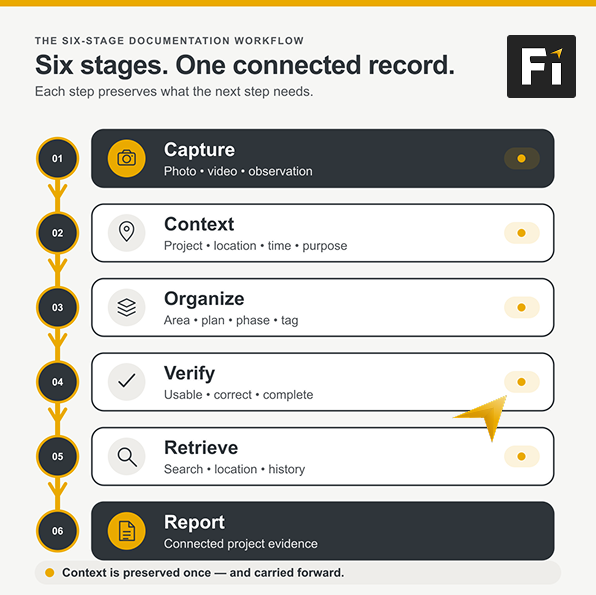
1. Capture the condition, activity, or change
Start with the evidence the project may need later: existing conditions, progress, an issue, corrective work, concealed work, a completed phase, or a decision point. The U.S. National Park Service project-photo guidance similarly calls for images of existing conditions, subsurface conditions, work to be covered, progress, rejected work, safety issues, and completed phases.
Capture enough visual context to make the subject understandable. One close-up may show detail but not location. A wider view can establish the area, while a closer view can preserve the specific condition. Explore Filio’s field capture tools for capturing and reviewing visual evidence in the field.
2. Attach context while it is still known
Context answers the questions that a filename cannot: Where was this captured? When? What does it show? Why was it recorded? Who captured it? Which project area, plan sheet, task, observation, or report does it relate to?
This is the point where an image starts becoming a record. W3C’s provenance model describes provenance as information about the entities, activities, and people involved in producing data. Construction teams do not need to implement that technical standard to use the principle: preserve enough origin and activity context to judge what a record means.
3. Organize around the project, not the device
Organization should follow the way the team will look for information: project, area, floor, plan, date, trade, phase, tag, issue, or report. A useful system does not depend on one person’s phone, personal folder structure, or memory. See how construction photo management in Filio keeps photos connected to project and location context.
4. Verify the record before the moment passes
A quick verification step catches the failures that are expensive to repair later: an unreadable image, the wrong project, a missing area, an unclear note, an incomplete sequence, or a photo that does not actually show the intended condition.
Verification does not mean turning every capture into a formal approval. It means confirming that the record is usable for its intended purpose before the team moves on.
5. Retrieve by question, not by folder path
The real test comes later. Can a teammate find the relevant record by asking about a location, date, plan, tag, person, activity, or condition? Can the team compare evidence across time without opening dozens of folders? Explore Filio’s AI documentation and keyword search workflow for finding relevant project records.
The FAIR Guiding Principles were developed for research data, not construction records, but their emphasis on identifiers, rich metadata, and indexing offers a useful general lesson: information becomes easier to reuse when it is deliberately made findable.
6. Report from connected records
Reporting should be the output of the documentation workflow, not a separate reconstruction exercise. When images already carry project and location context, the office can select, arrange, explain, and export the relevant evidence with less backtracking.
A report can still require professional judgment, review, and editing. The advantage is that the source material arrives with more of its meaning intact. See Filio’s construction reporting workflow for arranging field evidence into reports for review and sharing.
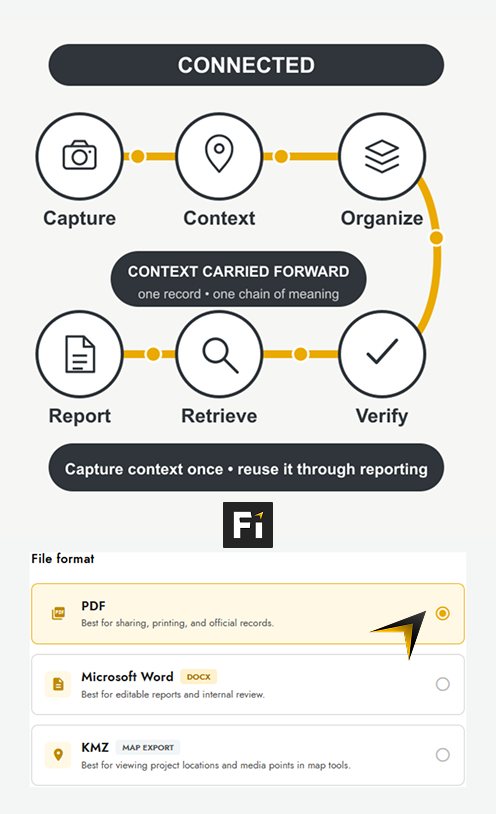
Fragmented Handoffs vs. a Connected Record
In a fragmented workflow, capture, labeling, storage, retrieval, and reporting happen in different tools or at different times. The same information is repeatedly re-entered, interpreted, or requested.
In a connected workflow, the record gains context once and carries it forward. The field team still captures the evidence, the office still reviews it, and a human still decides what belongs in the final report. The difference is that each stage starts with better information.
What a Minimum Viable Field Record Should Preserve
- The evidence itself: the photo, video, note, or document.
- The context: project, location, date and time, direction or viewpoint when relevant, and the reason for capture.
- The classification: area, phase, trade, tag, plan sheet, issue, or other agreed structure.
- The relationship: what activity, observation, report, or prior record this item connects to.
- The history: what changed, what was added later, and how the record was used.
- The retrieval path: how another authorized team member will find it months or years later.
How Filio Supports the Workflow
Filio connects mobile field capture with a web workspace. Teams can organize records by projects, maps, Plan Sheets, defined areas, metadata, tags, and timeline; find searchable project records using metadata and tags; and assemble project evidence into reports.
Filio also supports field capture when connectivity is limited, with synchronization behavior depending on the workflow and device state. That does not remove the need for verification, project governance, or human review. It helps keep capture and office access inside one documentation process.
Explore Filio Features to review the current supported capability set.
A Practical Rollout Checklist
- Define the moments that require documentation before the project starts.
- Agree on the minimum context required for each record.
- Use a project, location, plan, and classification structure the whole team understands.
- Verify records in the field or during the same shift whenever possible.
- Test retrieval with real questions, not only folder browsing.
- Build reports from the connected record and document any review or approval step.
- Review the workflow after handoffs, closeout, and staff changes to find where context is still being lost.
Frequently Asked Questions
What is a construction field documentation workflow?
It is the connected process used to capture field evidence, preserve its context, organize it, verify it, retrieve it, and turn it into usable project communication or reports.
Is field documentation the same as taking jobsite photos?
No. Photos are evidence inputs. Field documentation also preserves the project, location, time, purpose, classification, relationships, and history that make those inputs usable later.
When should context be added?
As close to capture as practical. The longer the delay, the more the workflow depends on memory and follow-up.
Does software remove the need for human review?
No. Software can connect capture, context, retrieval, and reporting, but teams still decide what to document, whether the record is accurate, and how it should be used.
What is the best way to test a documentation workflow?
Ask a teammate who was not present to find and explain a specific condition, location, or change. If the answer depends on calling the original photographer, the record is incomplete.
Carry Context Forward
A construction field documentation workflow succeeds when the project does not have to rebuild the meaning of its evidence at every handoff. Capture the record, preserve its context, organize it for the team, verify it while the moment is fresh, and let reporting begin from connected information.


