


You finish a walk through a concrete basement with a phone full of useful photos. Upstairs, the signal returns. The office still cannot find the images.
The missing step is not another photo. It is confirming that the locally captured record reached the right project and can be opened by the person who needs it.
Offline construction photo documentation separates capture from delivery. Prepare the device before losing connectivity, retain photos with enough context to identify them, then check the upload and the shared record after reconnecting. A working camera, a local thumbnail, and a completed cloud upload are three different things.
Three states to distinguish before you leave the site
Use these as team handoff checks, not as promised status labels in any particular app:
- Captured locally: the image opens on the capture device without a connection.
- Transferred: the intended upload has finished, rather than merely started.
- Checked in the project: the expected record opens in the correct shared project with usable context.
A signal indicator confirms connectivity, not delivery. A thumbnail alone does not prove that the full image, its notes, or its project association are available to another person.
This article covers that offline-to-online boundary. For the broader capture, organization, review, and reporting sequence, use the construction field documentation workflow.

Before the visit: test the route from capture to upload
Run a small test on the device, app version, and account the team will actually use. Do it in a safe place before the site visit, without interrupting required communications.
- Open the intended project while connected. Confirm access and check whether the reference material you will need is available locally. Do not assume cloud-only photos, maps, or drawings will load offline.
- Check storage, battery, and permissions. Leave room for the expected photos and videos. Confirm the camera and any location permissions you intend to use.
- Test without a network connection. Capture a clearly identified test photo, add the context your workflow supports, and confirm that the saved image can be reopened locally.
- Reconnect and initiate the required upload. Check the configured network option, wait for completion, and open the result from the shared project.
- Record the exception path. Decide who will retain the device and investigate if an upload cannot be completed before handoff.
Passing this test establishes what worked on that setup. It does not establish that every device, file type, reference layer, or app feature works offline.
During capture: preserve the context that cannot be recreated later
Offline conditions do not reduce the need for clear field records. Capture a wider view to establish the area, then a closer view of the condition. Record the project, floor or zone, subject, and reason for the photo through the supported fields or your agreed field log.
Location coordinates can be useful, but an indoor coordinate is not a room reference. If the app does not provide reliable location context at the point of capture, add a clear human-readable location rather than implying precision you have not checked.
Keep observations separate from decisions. A photo can document what was visible; it does not by itself establish compliance, approval, causation, or a completed inspection.
For a practical list of views and context to retain, see the jobsite photo documentation checklist.

What Filio’s offline and sync settings mean in practice
Filio supports offline capture and local retention in its mobile workflow. Treat that capability separately from uploading the resulting media to the shared project.
Filio’s published upload and local-storage policy describes user-initiated transfers and platform-specific background transfer behavior. It is not a promise that every file uploads immediately, without user action, or despite a closed app or unavailable network.
The Filio sync and storage guide explains network preferences and removal of already-synced media from local storage. Check those settings on the device before the visit. An upload waiting for Wi-Fi can behave differently from one permitted to use cellular data.
The illustrated settings detail comes from that Academy guide. Use your installed app’s available controls and verify the outcome; the illustration is not proof that every version presents an identical screen.
After reconnecting: verify the record, not just the connection
Assign one person to close the transfer step for each capture device. A short check is more useful than a general message that the photos were sent.
- Check the destination. Open the expected project and location or grouping.
- Check coverage. Compare the expected capture set with the records that arrived. Investigate gaps and duplicate attempts.
- Open representative full images. Include the first and last captures and anything essential to the handoff.
- Check context. Confirm that the available notes, dates, and location references still describe the correct condition.
- Check access. Have the intended reviewer confirm that the needed records are available through their permitted account or sharing path.
Do not clear unsynced local files, uninstall the app, or reset the device as a first response to a delayed upload. Retain the source material while the missing transfer is investigated. Apply the team’s retention policy only after the required records have been checked.
When a record does not arrive
The photo opens locally but is missing online. Check the selected project, upload action, permitted network, and any visible pending or failed-transfer indication. Keep the local copy while investigating.
Wi-Fi is connected, but transfer does not finish. Confirm the connection actually has internet access and whether a sign-in page or site restriction is involved. Do not repeatedly duplicate the same upload without checking the existing attempt.
The record arrived, but the context is incomplete. Correct the project record through the supported workflow while the field observer can still explain it. Do not fabricate missing capture details.
A drawing or older photo will not open offline. Treat it as unavailable until verified otherwise. Cloud access and offline capture are separate capabilities; plan a supported local reference or an agreed alternative before the next visit.
If the cause is unclear, keep a concise record of the device, app version, connection type, affected project, and observed result for support. Do not include private project media in a public troubleshooting post.
Only then build the report or hand over the record
Once the captured material is available and checked, select the views that answer the recipient’s question. Keep enough location and observation context for someone who was not on the visit.
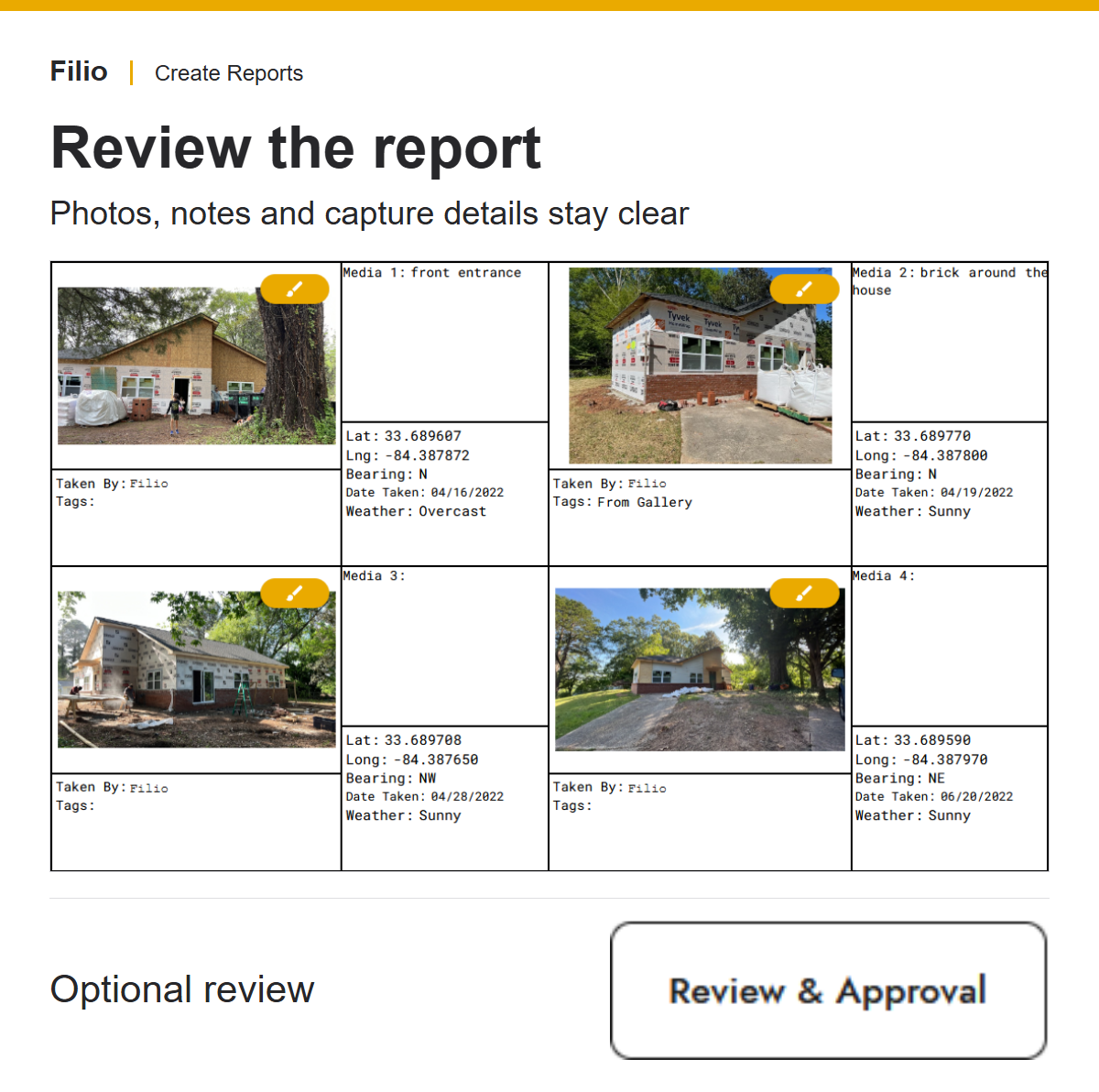
Filio’s Create Reports workflow covers assembling selected media into a reviewed deliverable. The report example here illustrates that later output stage; it does not prove that a particular offline capture was uploaded successfully.
The handoff is complete when the recipient can use the record, not when the capture device shows a successful connection. For long-term retrieval beyond a single report, keep the record within an agreed searchable project-record structure.
Make the connection gap a planned step
Before the next low-connectivity visit, test one capture all the way through to a checked shared record. Agree who owns the upload check and what happens if it fails. That small operational decision keeps offline capture from becoming an invisible handoff gap.
Talk with Filio about your field-documentation workflow and verify the mobile capture and transfer behavior your team needs before rollout.


